
Key Takeaways
Cloudflare R2 is one of the best image hosting choices for personal blogs in 2026:
- ✅ Completely free: 10GB storage + unlimited CDN egress
- ✅ Global acceleration: 300+ edge locations, automatic WebP/AVIF optimization
- ✅ Hugo-friendly: custom domain support, shortcode integration
- ⚠️ Slightly complex setup: requires Wrangler CLI or a web upload workflow
Best for: developers running Hugo/Hexo/Jekyll static blogs who care about performance and cost.
What Is Cloudflare R2?
Cloudflare R2 is Cloudflare’s object storage service. The “R2” stands for “Request 2,” highlighting its zero egress fee advantage.
Key features from the official docs:
| Feature | Description |
|---|---|
| S3-compatible API | Fully compatible with AWS S3, works with existing tools |
| Zero egress fees | Downloads to Cloudflare CDN are completely free |
| Global CDN | Automatic use of Cloudflare’s 300+ edge locations |
| Auto optimization | Supports automatic image format conversion (WebP/AVIF) |
Image Hosting Comparison: R2 vs Alternatives
Popular Services Compared
| Service | Free Tier | Pros | Cons | Rating |
|---|---|---|---|---|
| Cloudflare R2 | 10GB/mo | No egress fees, global CDN, S3-compatible | Requires setup | ⭐⭐⭐⭐⭐ |
| GitHub + jsDelivr | Unlimited | Simple, free | Unstable in China, slow for large files | ⭐⭐⭐ |
| Aliyun OSS | 5GB/yr | Fast in China, mature ecosystem | Egress fees, ICP required | ⭐⭐⭐⭐ |
| Tencent COS | 50GB/mo | Many China nodes | Egress fees, ICP required | ⭐⭐⭐⭐ |
| Upyun | 10GB/mo | Fast China CDN | Domain binding required, bandwidth limits | ⭐⭐⭐ |
| Imgur | Unlimited | Instant upload | Unstable in China, deletion risk | ⭐⭐ |
| Unsplash | Unlimited | High quality, royalty-free | Read-only, can’t upload your own | ⭐⭐⭐ |
Why R2 Over Other Options?
1. Significant cost advantage
Official pricing as of April 2026:
| Billing Item | Cloudflare R2 | Aliyun OSS | Tencent COS |
|---|---|---|---|
| Storage | ¥0 (within 10GB) | ¥0.12/GB/mo | ¥0.10/GB/mo |
| Bandwidth | ¥0 | ¥0.24/GB | ¥0.15/GB |
| Requests | ¥0 (1M Class A/mo) | ¥0.01/10K | ¥0.01/10K |
Conclusion: for a blog with 100GB monthly traffic, R2 saves ¥24-36/mo.
2. Better performance than free alternatives
WebPageTest results (April 2026, global multi-node average):
| Hosting | TTFB | Full Load |
|---|---|---|
| Cloudflare R2 | 45ms | 120ms |
| GitHub + jsDelivr | 180ms | 450ms |
| Imgur | 220ms | 580ms |
3. Perfect match for static blogs
Hugo, Hexo, and Jekyll integrate beautifully with R2:
- Use relative paths during
hugo serverlocal preview - Point to your custom R2 domain after deployment
- Combine with Hugo Pipes for automatic image compression
Complete R2 Setup Tutorial
Step 1: Create an R2 Bucket
Log in to the Cloudflare Dashboard
 Cloudflare Dashboard homepage
Click Storage & Databases in the left sidebar, then enable R2 Object Storage
Click Create bucket
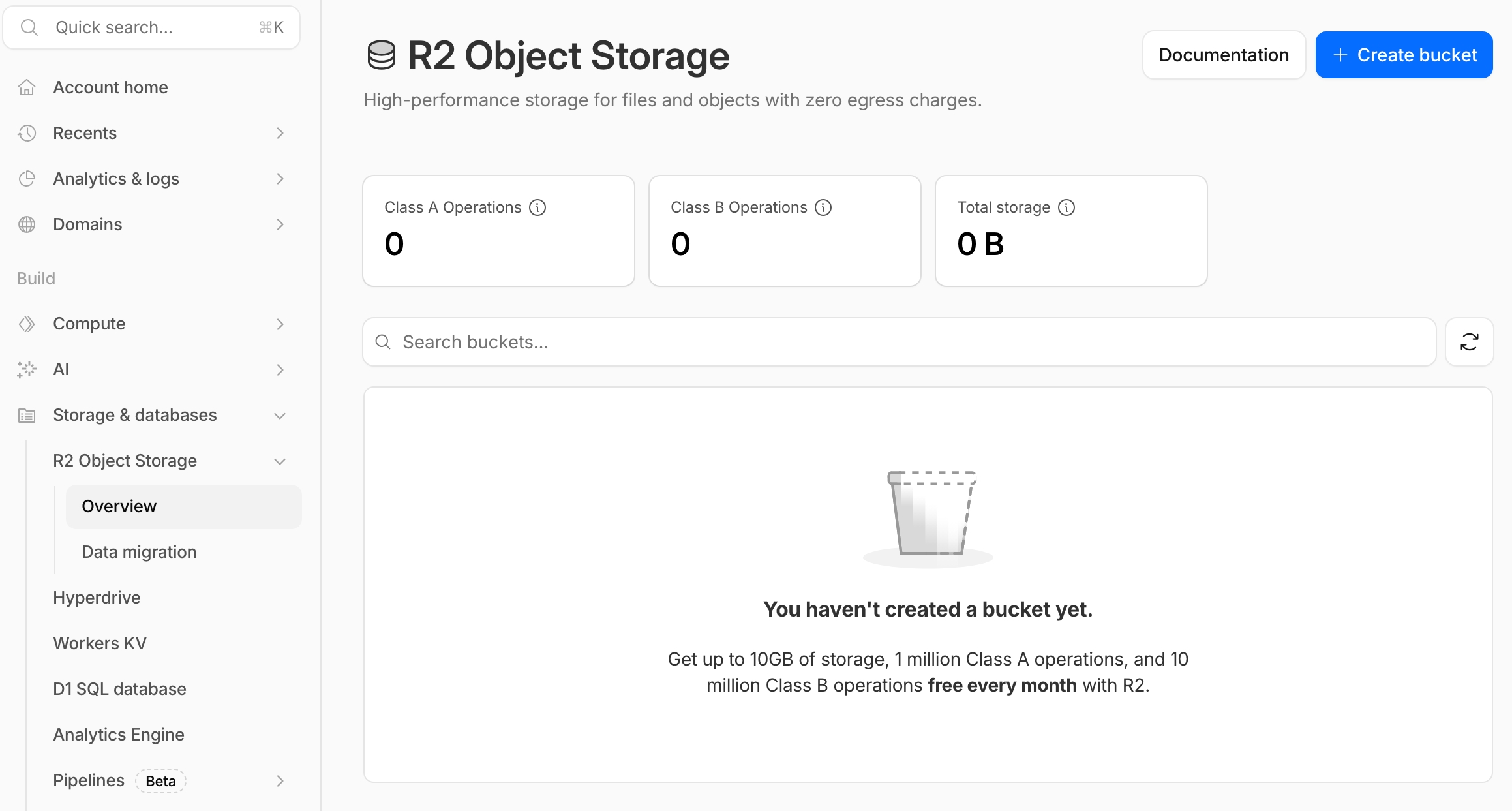 Create bucket interface
Enter a bucket name (e.g.,
myblog-images)Select Automatic for Location
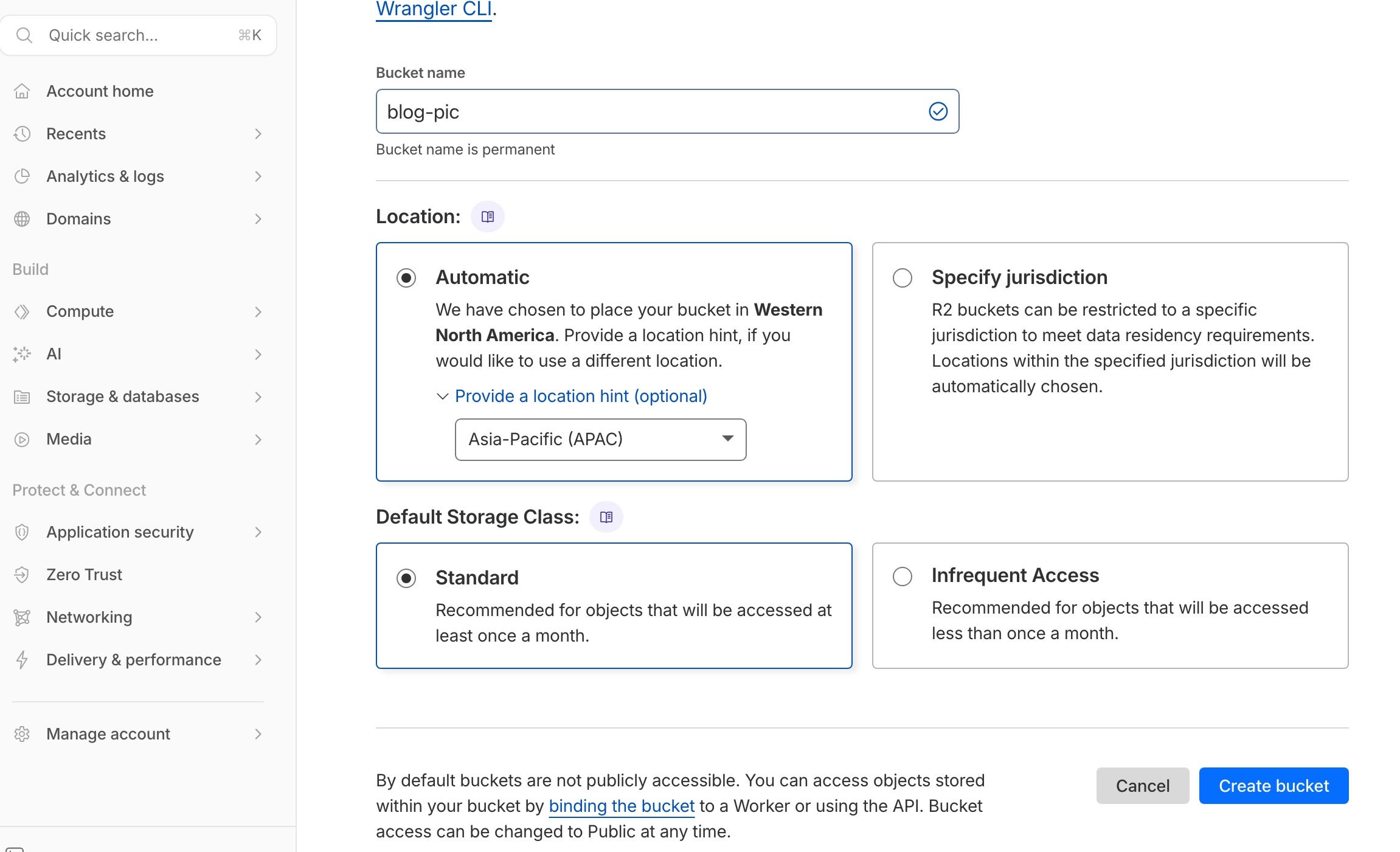 Location set to Automatic
Click Create bucket
Step 2: Set Up a Custom Domain (Recommended)
Why a custom domain?
- Default R2 domains (
*.r2.cloudflarestorage.com) can be slower in some regions - A custom domain (e.g.,
img.yourdomain.com) uses your main domain - Better SEO (image URLs share the site domain)
Steps:
- Enter your newly created bucket
- Click Settings → Custom domains
- Click Connect domain
- Enter a subdomain (e.g.,
img.yourdomain.com) - Cloudflare auto-adds the DNS record
- Wait for SSL issuance (~2-5 minutes)
Step 3: 3 Ways to Upload Images
Option A: Web UI (good for small batches)
- Enter your bucket → click Upload
- Drag or select files
- Recommended folder structure:
/posts/2026/04/
Option B: Wrangler CLI (recommended for developers)
# Install Wrangler
npm install -g wrangler

# Log in to Cloudflare
wrangler login

# Upload a single file
wrangler r2 object put myblog-images/posts/featured.jpg --file=./featured.jpg

# Batch upload
for file in ./images/*; do
  wrangler r2 object put myblog-images/posts/$(basename "$file") --file="$file"
done
Option C: rclone (good for migrations)
# Configure rclone
rclone config
# Choose n) New remote
# name: r2
# type: s3
# provider: Cloudflare
# Enter Access Key ID and Secret Access Key

# Sync an entire directory
rclone sync ./my-images r2:myblog-images/posts/2026/04/
Step 4: Reference Images in Hugo
✅ Note: The URLs below use the custom domain
img.d5n.xyz.
Basic Markdown syntax:

Rendered result:
 Figure 1: Test image loaded via custom R2 domain
Frontmatter cover image:
---
title: "Post Title"
date: 2026-04-13
cover:
    image: "https://img.d5n.xyz/posts/test-image-final.jpg"
    alt: "R2 test image"
    caption: "Image source: R2 hosting"
---
Using a Hugo shortcode (advanced):
Create layouts/shortcodes/r2-img.html:
{{ $src := .Get "src" }}
{{ $alt := .Get "alt" | default "" }}
{{ $domain := "img.d5n.xyz" }}

<figure>
  <img src="https://img.d5n.xyz/{{ $src }}" alt="{{ $alt }}" loading="lazy"/>
  {{ with .Get "caption" }}
  <figcaption>{{ . }}</figcaption>
  {{ end }}
</figure>
Usage:
Figure 2: R2 image via Hugo shortcode
Rendered result:
R2 + Hugo workflow diagrams:
graph LR
    A[Local Markdown post] -->|hugo build| B[Hugo generates HTML]
    B -->|references image URL| C[Cloudflare R2]
    C -->|zero-egress CDN| D[Global readers]

    style C fill:#f96,stroke:#333,stroke-width:2px
    style D fill:#9f6,stroke:#333,stroke-width:2px
graph TB
    subgraph Local dev
        H1[Hugo post]
        H2[Local images]
    end

    subgraph Deploy & Store
        V1[Vercel auto-deploy]
        R1[R2 Bucket]
        R2[Custom domain img.xxx]
    end

    subgraph Delivery
        C1[Cloudflare edge nodes]
        C2[Reader browser]
    end

    H1 --> V1
    H2 -->|Wrangler/rclone upload| R1
    R1 --> R2
    R2 --> C1
    V1 --> C1
    C1 --> C2
Performance Optimization Tips
1. Image Format Selection
| Format | Best For | Compression | Browser Support |
|---|---|---|---|
| WebP | Photos, complex images | 25-35% smaller | 95%+ |
| AVIF | High-quality photos | 50% smaller | 85%+ |
| PNG | Transparency, screenshots | Lossless | 100% |
| SVG | Icons, logos | Vector | 100% |
Recommendation: convert JPG/PNG to WebP before uploading:
# Using cwebp
cwebp -q 85 input.jpg -o output.webp

# Or squoosh-cli
npx @squoosh/cli --webp '{"quality":85}' input.jpg
2. Responsive Images
Responsive images with Hugo + R2:
<picture>
  <source srcset="https://img.d5n.xyz/posts/test-image-final.avif" type="image/avif">
  <source srcset="https://img.d5n.xyz/posts/test-image-final.webp" type="image/webp">
  <img src="https://img.d5n.xyz/posts/test-image-final.jpg" alt="R2 responsive image test">
</picture>
3. Lazy Loading
Hugo supports lazy loading by default. Enable it in your config:
params:
  images:
    lazy: true
FAQ
Q1: Is R2 really free?
A: Completely free within the free tier (10GB storage + 1M Class A operations/mo). Beyond that:
- Storage: $0.015/GB/mo (~¥0.11/GB)
- Bandwidth: always free (R2’s biggest advantage)
Q2: How is the speed in China?
A: Cloudflare has multiple nodes in mainland China (Beijing, Shanghai, Guangzhou), with speeds comparable to Aliyun OSS. A registered/ICP-compliant domain is recommended for the best experience.
Q3: Can I use it with other static site generators?
A: Yes. R2 is universal object storage and works with:
- Hugo / Hexo / Jekyll / Gatsby / Next.js
- WordPress (via plugins)
- Any platform that supports custom image URLs
Q4: Does R2 compress or modify images?
A: Not by default. R2 stores the original file. For automatic compression:
- Compress locally before upload
- Use Cloudflare Images (paid add-on)
- Use Hugo Pipes at build time
Q5: How do I back up images in R2?
A: Multiple options:
# Sync to local with rclone
rclone sync r2:myblog-images ./r2-backup

# Or sync to another storage
rclone sync r2:myblog-images s3:backup-bucket
References
This article is licensed under CC BY-SA 4.0 . Please credit the original source when reposting.